
One of the configured repositories failed (Unknown),
and yum doesn't have enough cached data to continue. At this point the only
safe thing yum can do is fail. There are a few ways to work "fix" this:
1. Contact the upstream for the repository and get them to fix the problem.
2. Reconfigure the baseurl/etc. for the repository, to point to a working
upstream. This is most often useful if you are using a newer
distribution release than is supported by the repository (and the
packages for the previous distribution release still work).
3. Run the command with the repository temporarily disabled
yum --disablerepo=<repoid> ...
4. Disable the repository permanently, so yum won't use it by default. Yum
will then just ignore the repository until you permanently enable it
again or use --enablerepo for temporary usage:
yum-config-manager --disable <repoid>
or
subscription-manager repos --disable=<repoid>
5. Configure the failing repository to be skipped, if it is unavailable.
Note that yum will try to contact the repo. when it runs most commands,
so will have to try and fail each time (and thus. yum will be be much
slower). If it is a very temporary problem though, this is often a nice
compromise:
Ik heb het bestand /etc/yum.repos.d/CentOS-Base.repo met nano bekeken en zoals in deze image de basUrl uncommented:
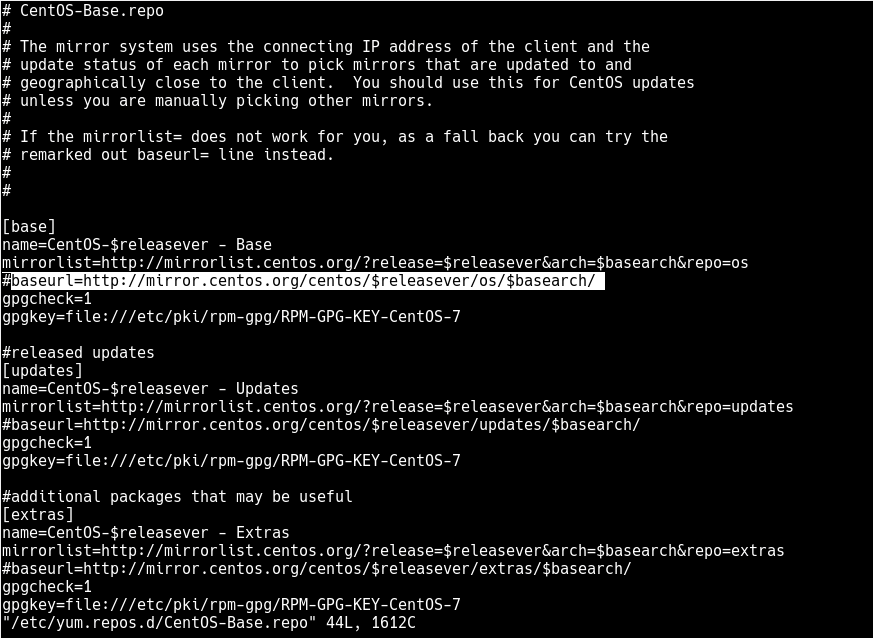
http://mirror.centos.org/centos/$releasever/os/$basearch/
De url hierboven nadat ik weer een update heb gedaan na het opslaan, krijg een 404 error.
Weet iemand wat de juist URL is?
ik heb CENTOS 7.2.1511
Hopelijk is hier een oplossing voor.
