

 De PHPhulp kroeg


While loop returned lege array waarde aan het einde





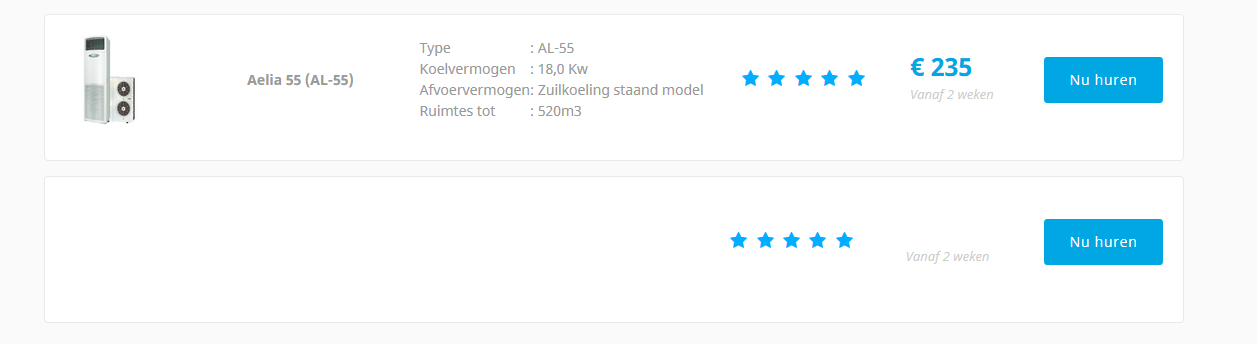
Zoals hier: https://i.gyazo.com/3da3e92fb55a5b80233576bf490dd71d.png
Er staat geen leeg veld in de database dus het ligt ergens aan mn code.
Dit is mn query en foreach loopje:
Code (php)


1
2
3
4
5
6
7
8
9
10
11
12
13
14
15
16
17
18
19
20
21
22
23
24
25
26
27
28
29
30
31
32
33
34
35
36
37
38
39
40
41
42
43
44
45
46
47
48
2
3
4
5
6
7
8
9
10
11
12
13
14
15
16
17
18
19
20
21
22
23
24
25
26
27
28
29
30
31
32
33
34
35
36
37
38
39
40
41
42
43
44
45
46
47
48
<?
// content
$content = "SELECT * FROM `lb_content` WHERE catid = 13";
$contentcon = $conn->query($content);
$contentcr = array();
while ($contentcr[] = $contentcon->fetch_array());
foreach($contentcr as $content)
{
$article_images = $content['images']; // Get image parameters of the article
$pictures = json_decode($article_images); // Split the parameters apart
$contentje .= '<li class="job_listing">
<a href="http://www.website.nl/_extern/website/content.php?alias='.$content['alias'].'">
<div class="location job_img">
<img name="images" src="/_extern/website/cms/'.$pictures->{'image_intro'}.'" alt="" class="company_logo">
</div>
<div class="location boldfont">
'.$content['title'].'
</div>
<div class="location specificaties">
'.$content['introtext'].'
</div>
<div class="rating location">
<div class="rating-stars">
<i class="fa fa-star"></i>
<i class="fa fa-star"></i>
<i class="fa fa-star"></i>
<i class="fa fa-star"></i>
<i class="fa fa-star"></i>
</div>
</div>
<div class="location prijs">
'.$content['metakey'].'
<br>
<div class="cursief">Vanaf 2 weken</div>
</div>
<div class="location">
<button type="submit" class="btn btn-primary buttonblock" onClick="location.href="http://www.website.nl/_extern/website/content.php?page="'.$content['alias'].'">Nu huren</button>
</div>
</a>
</li>'; // Here
}
echo $contentje;
?>
// content
$content = "SELECT * FROM `lb_content` WHERE catid = 13";
$contentcon = $conn->query($content);
$contentcr = array();
while ($contentcr[] = $contentcon->fetch_array());
foreach($contentcr as $content)
{
$article_images = $content['images']; // Get image parameters of the article
$pictures = json_decode($article_images); // Split the parameters apart
$contentje .= '<li class="job_listing">
<a href="http://www.website.nl/_extern/website/content.php?alias='.$content['alias'].'">
<div class="location job_img">
<img name="images" src="/_extern/website/cms/'.$pictures->{'image_intro'}.'" alt="" class="company_logo">
</div>
<div class="location boldfont">
'.$content['title'].'
</div>
<div class="location specificaties">
'.$content['introtext'].'
</div>
<div class="rating location">
<div class="rating-stars">
<i class="fa fa-star"></i>
<i class="fa fa-star"></i>
<i class="fa fa-star"></i>
<i class="fa fa-star"></i>
<i class="fa fa-star"></i>
</div>
</div>
<div class="location prijs">
'.$content['metakey'].'
<br>
<div class="cursief">Vanaf 2 weken</div>
</div>
<div class="location">
<button type="submit" class="btn btn-primary buttonblock" onClick="location.href="http://www.website.nl/_extern/website/content.php?page="'.$content['alias'].'">Nu huren</button>
</div>
</a>
</li>'; // Here
}
echo $contentje;
?>
Dit is de array als ik hem uitlees:
Code (php)
1
2
3
4
5
6
7
8
9
10
11
12
13
14
15
16
17
18
19
20
21
22
23
24
25
26
27
28
29
30
31
32
33
34
35
36
37
38
39
40
41
42
43
44
45
46
47
48
49
50
51
52
53
54
55
56
57
58
59
60
61
62
63
64
65
66
67
68
69
70
71
72
73
74
75
76
77
78
79
80
81
82
83
84
85
86
87
88
89
90
91
92
93
94
95
96
97
98
99
100
101
102
103
104
105
106
107
108
109
110
111
112
113
114
115
116
2
3
4
5
6
7
8
9
10
11
12
13
14
15
16
17
18
19
20
21
22
23
24
25
26
27
28
29
30
31
32
33
34
35
36
37
38
39
40
41
42
43
44
45
46
47
48
49
50
51
52
53
54
55
56
57
58
59
60
61
62
63
64
65
66
67
68
69
70
71
72
73
74
75
76
77
78
79
80
81
82
83
84
85
86
87
88
89
90
91
92
93
94
95
96
97
98
99
100
101
102
103
104
105
106
107
108
109
110
111
112
113
114
115
116
<?
[5] => Array
(
[0] => 16
[id] => 16
[1] => 84
[asset_id] => 84
[2] => Aelia 55 (AL-55)
[title] => Aelia 55 (AL-55)
[3] => aelia-55-al-55
[alias] => aelia-55-al-55
[4] =>
Type
: AL-55
Koelvermogen
: 18,0 Kw
Afvoervermogen
: Zuilkoeling staand model
Ruimtes tot
: 520m3
[introtext] =>
Type
: AL-55
Koelvermogen
: 18,0 Kw
Afvoervermogen
: Zuilkoeling staand model
Ruimtes tot
: 520m3
[5] =>
[fulltext] =>
[6] => 1
[state] => 1
[7] => 13
[catid] => 13
[8] => 2015-11-30 10:38:11
[created] => 2015-11-30 10:38:11
[9] => 361
[created_by] => 361
[10] =>
[created_by_alias] =>
[11] => 2015-12-09 14:07:30
[modified] => 2015-12-09 14:07:30
[12] => 361
[modified_by] => 361
[13] => 361
[checked_out] => 361
[14] => 2015-12-09 14:07:30
[checked_out_time] => 2015-12-09 14:07:30
[15] => 2015-11-30 10:38:11
[publish_up] => 2015-11-30 10:38:11
[16] => 0000-00-00 00:00:00
[publish_down] => 0000-00-00 00:00:00
[17] => {"image_intro":"images\/website\/AELIA_55.jpg","float_intro":"","image_intro_alt":"","image_intro_caption":"","image_fulltext":"","float_fulltext":"","image_fulltext_alt":"","image_fulltext_caption":""}
[images] => {"image_intro":"images\/website\/AELIA_55.jpg","float_intro":"","image_intro_alt":"","image_intro_caption":"","image_fulltext":"","float_fulltext":"","image_fulltext_alt":"","image_fulltext_caption":""}
[18] => {"urla":false,"urlatext":"","targeta":"","urlb":false,"urlbtext":"","targetb":"","urlc":false,"urlctext":"","targetc":""}
[urls] => {"urla":false,"urlatext":"","targeta":"","urlb":false,"urlbtext":"","targetb":"","urlc":false,"urlctext":"","targetc":""}
[19] => {"show_title":"","link_titles":"","show_tags":"","show_intro":"","info_block_position":"","show_category":"","link_category":"","show_parent_category":"","link_parent_category":"","show_author":"","link_author":"","show_create_date":"","show_modify_date":"","show_publish_date":"","show_item_navigation":"","show_icons":"","show_print_icon":"","show_email_icon":"","show_vote":"","show_hits":"","show_noauth":"","urls_position":"","alternative_readmore":"","article_layout":"","show_publishing_options":"","show_article_options":"","show_urls_images_backend":"","show_urls_images_frontend":""}
[attribs] => {"show_title":"","link_titles":"","show_tags":"","show_intro":"","info_block_position":"","show_category":"","link_category":"","show_parent_category":"","link_parent_category":"","show_author":"","link_author":"","show_create_date":"","show_modify_date":"","show_publish_date":"","show_item_navigation":"","show_icons":"","show_print_icon":"","show_email_icon":"","show_vote":"","show_hits":"","show_noauth":"","urls_position":"","alternative_readmore":"","article_layout":"","show_publishing_options":"","show_article_options":"","show_urls_images_backend":"","show_urls_images_frontend":""}
[20] => 8
[version] => 8
[21] => 0
[ordering] => 0
[22] => ��� 235
[metakey] => ��� 235
[23] =>
[metadesc] =>
[24] => 1
[access] => 1
[25] => 0
[hits] => 0
[26] => {"robots":"","author":"","rights":"","xreference":""}
[metadata] => {"robots":"","author":"","rights":"","xreference":""}
[27] => 0
[featured] => 0
[28] => *
[language] => *
[29] =>
[xreference] =>
)
[6] =>
)
?>
[5] => Array
(
[0] => 16
[id] => 16
[1] => 84
[asset_id] => 84
[2] => Aelia 55 (AL-55)
[title] => Aelia 55 (AL-55)
[3] => aelia-55-al-55
[alias] => aelia-55-al-55
[4] =>
Type
: AL-55
Koelvermogen
: 18,0 Kw
Afvoervermogen
: Zuilkoeling staand model
Ruimtes tot
: 520m3
[introtext] =>
Type
: AL-55
Koelvermogen
: 18,0 Kw
Afvoervermogen
: Zuilkoeling staand model
Ruimtes tot
: 520m3
[5] =>
[fulltext] =>
[6] => 1
[state] => 1
[7] => 13
[catid] => 13
[8] => 2015-11-30 10:38:11
[created] => 2015-11-30 10:38:11
[9] => 361
[created_by] => 361
[10] =>
[created_by_alias] =>
[11] => 2015-12-09 14:07:30
[modified] => 2015-12-09 14:07:30
[12] => 361
[modified_by] => 361
[13] => 361
[checked_out] => 361
[14] => 2015-12-09 14:07:30
[checked_out_time] => 2015-12-09 14:07:30
[15] => 2015-11-30 10:38:11
[publish_up] => 2015-11-30 10:38:11
[16] => 0000-00-00 00:00:00
[publish_down] => 0000-00-00 00:00:00
[17] => {"image_intro":"images\/website\/AELIA_55.jpg","float_intro":"","image_intro_alt":"","image_intro_caption":"","image_fulltext":"","float_fulltext":"","image_fulltext_alt":"","image_fulltext_caption":""}
[images] => {"image_intro":"images\/website\/AELIA_55.jpg","float_intro":"","image_intro_alt":"","image_intro_caption":"","image_fulltext":"","float_fulltext":"","image_fulltext_alt":"","image_fulltext_caption":""}
[18] => {"urla":false,"urlatext":"","targeta":"","urlb":false,"urlbtext":"","targetb":"","urlc":false,"urlctext":"","targetc":""}
[urls] => {"urla":false,"urlatext":"","targeta":"","urlb":false,"urlbtext":"","targetb":"","urlc":false,"urlctext":"","targetc":""}
[19] => {"show_title":"","link_titles":"","show_tags":"","show_intro":"","info_block_position":"","show_category":"","link_category":"","show_parent_category":"","link_parent_category":"","show_author":"","link_author":"","show_create_date":"","show_modify_date":"","show_publish_date":"","show_item_navigation":"","show_icons":"","show_print_icon":"","show_email_icon":"","show_vote":"","show_hits":"","show_noauth":"","urls_position":"","alternative_readmore":"","article_layout":"","show_publishing_options":"","show_article_options":"","show_urls_images_backend":"","show_urls_images_frontend":""}
[attribs] => {"show_title":"","link_titles":"","show_tags":"","show_intro":"","info_block_position":"","show_category":"","link_category":"","show_parent_category":"","link_parent_category":"","show_author":"","link_author":"","show_create_date":"","show_modify_date":"","show_publish_date":"","show_item_navigation":"","show_icons":"","show_print_icon":"","show_email_icon":"","show_vote":"","show_hits":"","show_noauth":"","urls_position":"","alternative_readmore":"","article_layout":"","show_publishing_options":"","show_article_options":"","show_urls_images_backend":"","show_urls_images_frontend":""}
[20] => 8
[version] => 8
[21] => 0
[ordering] => 0
[22] => ��� 235
[metakey] => ��� 235
[23] =>
[metadesc] =>
[24] => 1
[access] => 1
[25] => 0
[hits] => 0
[26] => {"robots":"","author":"","rights":"","xreference":""}
[metadata] => {"robots":"","author":"","rights":"","xreference":""}
[27] => 0
[featured] => 0
[28] => *
[language] => *
[29] =>
[xreference] =>
)
[6] =>
)
?>
De laatste is leeg (6). Maar er staat geen lege waarde in de database.
Gewijzigd op 22/12/2015 13:05:43 door Snelle Jaap


Grote kans dat dit door je while-constructie komt. De while-lust houdt op als fetch_array() false retourneert (en voor het begrip: de toegekende waarde is tevens de return-waarde van een toekenning zelf), maar dat resultaat stop je nog wel in $contentcr...
Daarnaast laat de naamgeving van je variabelen nogal te wensen over.
$content? dit is een querystring
$contentcon? dit is een resultset object
Daarna spring je je foreach in, waarom?
$content wordt op dit moment ook overschreven...
$content is de query inderdaad en $contencon de variabele voor de connectie. Hoezo laat dat te wensen over?
En inspringen waar het kan is netjes toch?
"$contentcon = $conn->query($content);
$contentcr = array();
while ($contentcr[] = $contentcon->fetch_array());
"
maak daar eens gewoon:
$contentcon = $conn->query($content);
while ($content = $contentcon->fetch_array());
van !
fetch_array geeft ja al gewoon een array. (waarom zou je die weer als element in een array willen stoppen?)
Quote:
$content is de query inderdaad en $contencon de variabele voor de connectie. Hoezo laat dat te wensen over?
$conn bevat als het goed is een mysqli object (dit is dus je "variabele voor de connectie"), $contentcon bevat na aanroep van de query() methode ofwel een boolean ofwel een mysqli_result object.
Quote:
En inspringen waar het kan is netjes toch?
Inspringen doe je niet waar het kan, maar waar het nodig is. In regel 8 van het eerste codefragment is dit niet nodig.
Hoe kan ik voor elkaar krijgen dat hij door de hele array loopt met een while? (Of een foreach zoals ik nu al heb.
Toevoeging op 22/12/2015 14:57:37:
Laat maar, ik heb alles binnen de foreach in de while gezet, en de code aangepast zoals Roeland zei. Nu werkt het! Thx
Code (php)
1
2
3
4
5
6
7
8
9
10
11
12
13
14
15
16
17
18
19
20
21
22
23
24
25
26
27
28
29
30
31
32
33
34
2
3
4
5
6
7
8
9
10
11
12
13
14
15
16
17
18
19
20
21
22
23
24
25
26
27
28
29
30
31
32
33
34
<?php
/* @var $res mysqli_result */
$res = $conn->query('SELECT * FROM `lb_content` WHERE catid = 13');
while ($row = $res->fetch_array()) {
// Get image parameters of the article and split them.
$pictures = json_decode($row['images']);
?><li class="job_listing">
<a href="http://www.website.nl/_extern/website/content.php?alias=<?php echo $row['alias'] ?>">
<div class="location job_img">
<img name="images" src="/_extern/website/cms/<?php echo $pictures->{'image_intro'} ?>" alt="" class="company_logo" />
</div>
<div class="location boldfont"><?php echo $row['title'] ?></div>
<div class="location specificaties"><?php echo $row['introtext'] ?></div>
<div class="rating location">
<div class="rating-stars">
<i class="fa fa-star"></i>
<i class="fa fa-star"></i>
<i class="fa fa-star"></i>
<i class="fa fa-star"></i>
<i class="fa fa-star"></i>
</div>
</div>
<div class="location prijs"><?php
echo $row['metakey'];
?><br />
<div class="cursief">Vanaf 2 weken</div>
</div>
<div class="location">
<button type="submit" class="btn btn-primary buttonblock" onClick="location.href='http://www.website.nl/_extern/website/content.php?page=<?php echo $row['alias'] ?>';">Nu huren</button>
</div>
</a>
</li><?php
}
?>
/* @var $res mysqli_result */
$res = $conn->query('SELECT * FROM `lb_content` WHERE catid = 13');
while ($row = $res->fetch_array()) {
// Get image parameters of the article and split them.
$pictures = json_decode($row['images']);
?><li class="job_listing">
<a href="http://www.website.nl/_extern/website/content.php?alias=<?php echo $row['alias'] ?>">
<div class="location job_img">
<img name="images" src="/_extern/website/cms/<?php echo $pictures->{'image_intro'} ?>" alt="" class="company_logo" />
</div>
<div class="location boldfont"><?php echo $row['title'] ?></div>
<div class="location specificaties"><?php echo $row['introtext'] ?></div>
<div class="rating location">
<div class="rating-stars">
<i class="fa fa-star"></i>
<i class="fa fa-star"></i>
<i class="fa fa-star"></i>
<i class="fa fa-star"></i>
<i class="fa fa-star"></i>
</div>
</div>
<div class="location prijs"><?php
echo $row['metakey'];
?><br />
<div class="cursief">Vanaf 2 weken</div>
</div>
<div class="location">
<button type="submit" class="btn btn-primary buttonblock" onClick="location.href='http://www.website.nl/_extern/website/content.php?page=<?php echo $row['alias'] ?>';">Nu huren</button>
</div>
</a>
</li><?php
}
?>
Daarbij nog twee opmerkingen:
- de quotes van je button onclick klopt niet
- overal waar echo '...' staat zou ik deze output escapen met htmlspecialchars() tenzij het de bedoeling is dat je daar HTML kunt afdrukken
en overal waar $content stond $row gebruiker dus...
Gewijzigd op 22/12/2015 15:13:56 door Thomas van den Heuvel
Ja ik wil graag dat er html opmaak mogelijk is (aangezien ik een tabel die is ingevoerd via een wysiwyg editor uitlees) dus dat is prima zo.
Wat bedoel je met dit laatste?
"en overal waar $content stond $row gebruiker dus..."
Gewijzigd op 22/12/2015 15:59:55 door Snelle Jaap